
Quick guide — 9-Line CAS brief
Purpose
The 9-Line is a compact, standard way for a JTAC/Tactical Controller to give attacking aircrew the essential targeting information they need to prosecute a weapons release safely and effectively. It focuses on the target location/description, friendly positions, weapon/fuze constraints, and ingress/egress.
Note: There are several doctrinal variations of the 9-line (service/country differences, doctrinal updates). The version below is the widely used JTAC → aircraft functional breakdown (what pilots expect to hear).
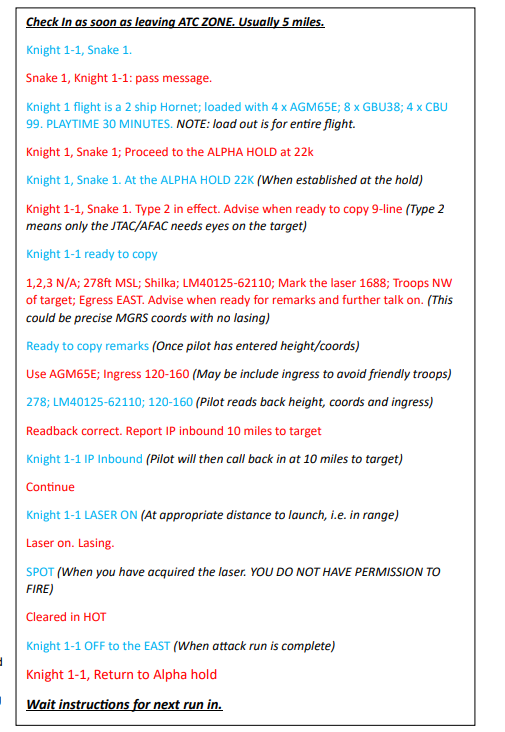
Pre-9-Line items
These are the common radio items you should send before the 9-line so aircrew can prepare and respond:
-
Check-in — identifies flight, position or that you’re leaving an ATC zone.
Example: “Check in as soon as leaving ATC ZONE. Usually 5 miles. Knight 1-1, Snake 1.” -
Readback/request to copy — controller tells the flight to be ready to copy the 9-line.
Example: “Knight 1-1 ready to copy.” -
Mission/ordnance and brief note — brief description of the flight loadout or playtime.
Example from picture: “Knight 1 flight is a 2 ship Hornet; loaded with 4 x AGM65E; 8 x GBU38; 4 x CBU 99. PLAYTIME 30 MINUTES. NOTE: load out is for entire flight.” -
Hold / IP / clearance to engage — where to hold and when to expect the IP call.
Example: “Proceed to the ALPHA HOLD at 22k. Report IP inbound 10 miles to target.”
The 9 lines — explanation + example mapping
Line 1 — IP/BP or Call-in (Initial Point / Battle Position)
-
What it conveys: Method of attack reference point for the run; where the aircraft will start the attack (or “IP inbound”).
-
Example from picture:
“Knight 1-1 IP Inbound (Pilot will then call back in at 10 miles to target)”
— or the controller may simply say “IP inbound 10 miles to target” as part of the pre-brief.
Line 2 — Heading (attack heading / bearing to target)
-
What it conveys: Attack heading or the magnetic/true bearing the aircraft should fly over the target (or heading from IP to target).
-
Example: your screenshot shows “Use AGM65E; Ingress 120-160 (May be include ingress to avoid friendly troops)” — the 120–160 is the ingress corridor/attack heading. In a 9-line you’d give: “Attack heading 120–160.”
Line 3 — Distance
-
What it conveys: Distance from IP to target (or distance from the aircraft position given at the time). Could be nautical miles.
-
Example mapping: The screenshot implies distances implicitly (IP inbound 10 miles). In a 9-line you might say: “Distance: IP to target 10 NM.”
Line 4 — Target elevation / height
-
What it conveys: Elevation of the target or height above mean sea level (MSL). Important for fuzing and sensor slant.
-
Example from picture: “278ft MSL” appears in the sample. So Line 4 = “Target elev: 278 ft MSL.”
Line 5 — Target description
-
What it conveys: One-line description of the target (type, size, known threats nearby). Keep it short and unambiguous.
-
Example from picture: “Shilka” (a AAA threat) — you could expand to: “Target: Shilka SPAAG (vehicle).”
Line 6 — Target location
-
What it conveys: Grid reference (MGRS), lat/long, or other precise coordinates. If laser code/bearing used, include here.
-
Example from picture: “LM40125-62110” (looks like a grid/MGRS) — so Line 6 = “MGRS: LM40125-62110.”
Line 7 — Mark / Type of attack / Orbit direction
-
What it conveys: How the target will be marked (laser, smoke, IP talk-on) and the attack profile (type of ordnance or attack heading). Could also include the ballistics/marking laser code.
-
Example from picture: “Mark the laser 1688; Laser on. Lasing.” → Line 7 = “Mark: Laser (Code 1688).”
Also the weapon selection/remarks earlier could be included here (e.g., “Using AGM-65E”).
Line 8 — Friendlies (location of friendly troops / restrictions)
-
What it conveys: Location of friendly elements relative to the target — direction and distance or MGRS. Also may include restrictions.
-
Example from picture: “Troops NW of target” and the additional safety: “SPOT (When you have acquired the laser, YOU DO NOT HAVE PERMISSION TO FIRE).”
So Line 8 = “Friendlies: Troops NW of target (distance if available).”
Line 9 — Egress / Remarks / Fuze / Clearance (ROE)
-
What it conveys: Egress direction, clearance level (Type 2/3, Restricted), fuzing or other restrictions, or additional remarks.
-
Example from picture:
-
“Egress EAST.” (egress direction)
-
“Type 2 in effect.” (level of control — Type 2 means JTAC has to see/mark the target and give clearance)
-
“Advise when ready for remarks and further talk on.”
So Line 9 could be: “Egress: East. Remarks: Type 2 in effect. Advise when ready for remarks.”
-